
The best Issuu alternatives depend on what you publish. If you want a cheaper flipbook that works much like Issuu, look at Calaméo, Yumpu, or FlipHTML5. If you publish catalogs or sales documents, Flipsnack and FlippingBook are better suited. If you run a magazine with paying subscribers who read on their phones, a reflowed digital edition platform like eMagazines will serve them better than a flipbook.
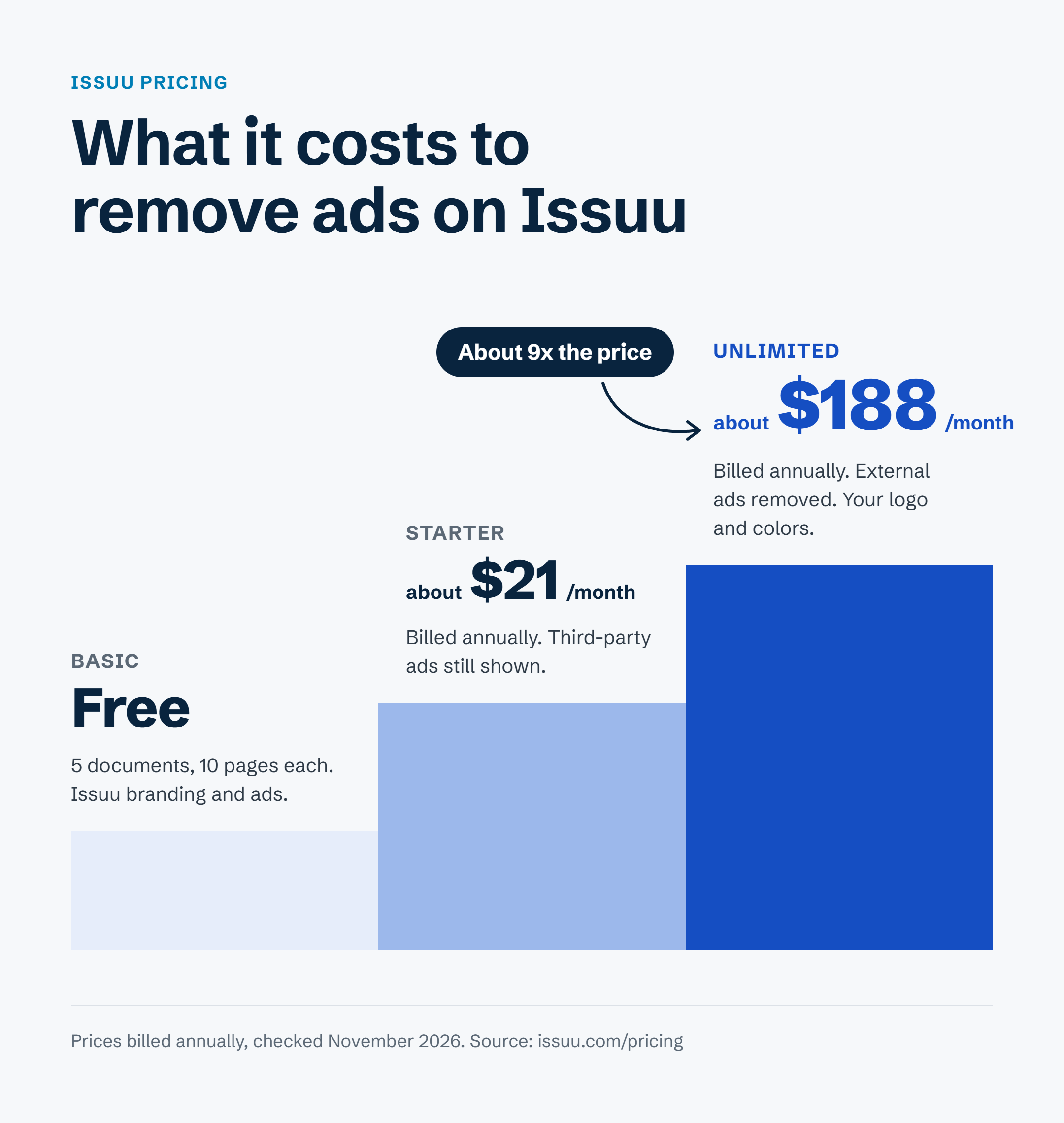
For many publishers, the search starts with price. On Issuu’s Starter plan, third-party ads still appear around your issues, and removing them requires a plan that costs about nine times as much. At the same time, readers on phones have to pinch and zoom to read pages that were designed for print.
I’ve spent more than two decades building digital publishing and audience businesses. When publishers tell me they want to leave Issuu, price is rarely the only reason. Their readers now read mostly on phones, and a flipbook is hard to read on a small screen.
Issuu alternatives at a glance
This table compares the seven best Issuu alternatives on reading format, starting price, and the type of publisher each one suits. We chose these platforms using five criteria:
- Reading experience on a phone. Can a subscriber read a full article on a small screen without zooming?
- True cost. What do you pay once ads and the vendor’s branding are removed?
- Subscriber delivery and access. Can you control who reads each issue, and how do readers get in?
- Ways to earn. Can you sell single issues or subscriptions?
- Production effort. How much work does your team do for every new issue?
| Platform | Reading format | Starting price | Best for |
|---|---|---|---|
| Calaméo | Flipbook replica | Premium about $14/month billed annually | The closest like-for-like Issuu replacement |
| Yumpu | Flipbook replica | Free, or €14.95/month billed annually | Free or low-cost public publishing |
| FlipHTML5 | Flipbook replica | Free, or $15/month (less billed yearly) | Selling single issues on a small budget |
| Flipsnack | Flipbook plus design studio | $16/month billed annually | Catalogs designed from scratch |
| FlippingBook | Flipbook replica | $26/month | Sales and marketing documents |
| eMagazines | Reflowed single-column mobile edition | Custom quote | Magazine publishers with paying subscribers |
| MagLoft | Responsive HTML articles plus apps | $199/month | Self-serve publishers who want branded apps |
| Issuu (for reference) | Flipbook replica | Starter about $21/month billed annually | Public discovery and simple sharing |
Why are publishers looking for Issuu alternatives?
Publishers look for Issuu alternatives for three main reasons: the price gap between plans, ads on the lower tiers, and a flipbook format that is hard to read on a phone.
Pricing. Under current Issuu pricing, the Starter plan costs about $21 per month billed annually and still shows third-party ads around your publications. To remove external ads, add your own logo and colors, and sell your flipbooks, you need the Unlimited plan at about $188 per month billed annually. Issuu doesn’t offer a plan between the two.
Format. Issuu turns your PDF into a page-turning flipbook. On a laptop, the full page is easy to read. On a phone, the same page shrinks to fit the screen, and the text becomes hard to read. Issuu also offers Articles, which are short mobile-friendly stories built from selected pages. Articles are designed for sharing on social channels, so they don’t replace a full issue for subscribers.
Most reading now happens on digital devices. According to Pew Research Center (2026), 88% of U.S. adults get news from a smartphone, computer, or tablet at least sometimes, and 59% do so often. Only 6% say they often get news from printed newspapers or magazines.
Recent changes. Issuu is now operated by Bending Spoons, a company based in Milan, according to the footer on Issuu’s site. Issuu also restructured its plans and pricing in October 2024, merging its Premium and Optimum plans into Unlimited. Its help center says it’s still in the process of updating prices and plans, so check the current terms before you renew.
Issuu does have strengths worth considering. Its public reading platform can bring new readers to your work, and its Digital Sales feature lets you sell issues through Stripe. If either one is important to your business, weigh it carefully before you switch.
Flipbook vs. reflowed edition: which format your readers need
Before you compare vendors, decide which reading format you need. Your readers will get either a flipbook replica of the print page or a reflowed edition built for the screen.
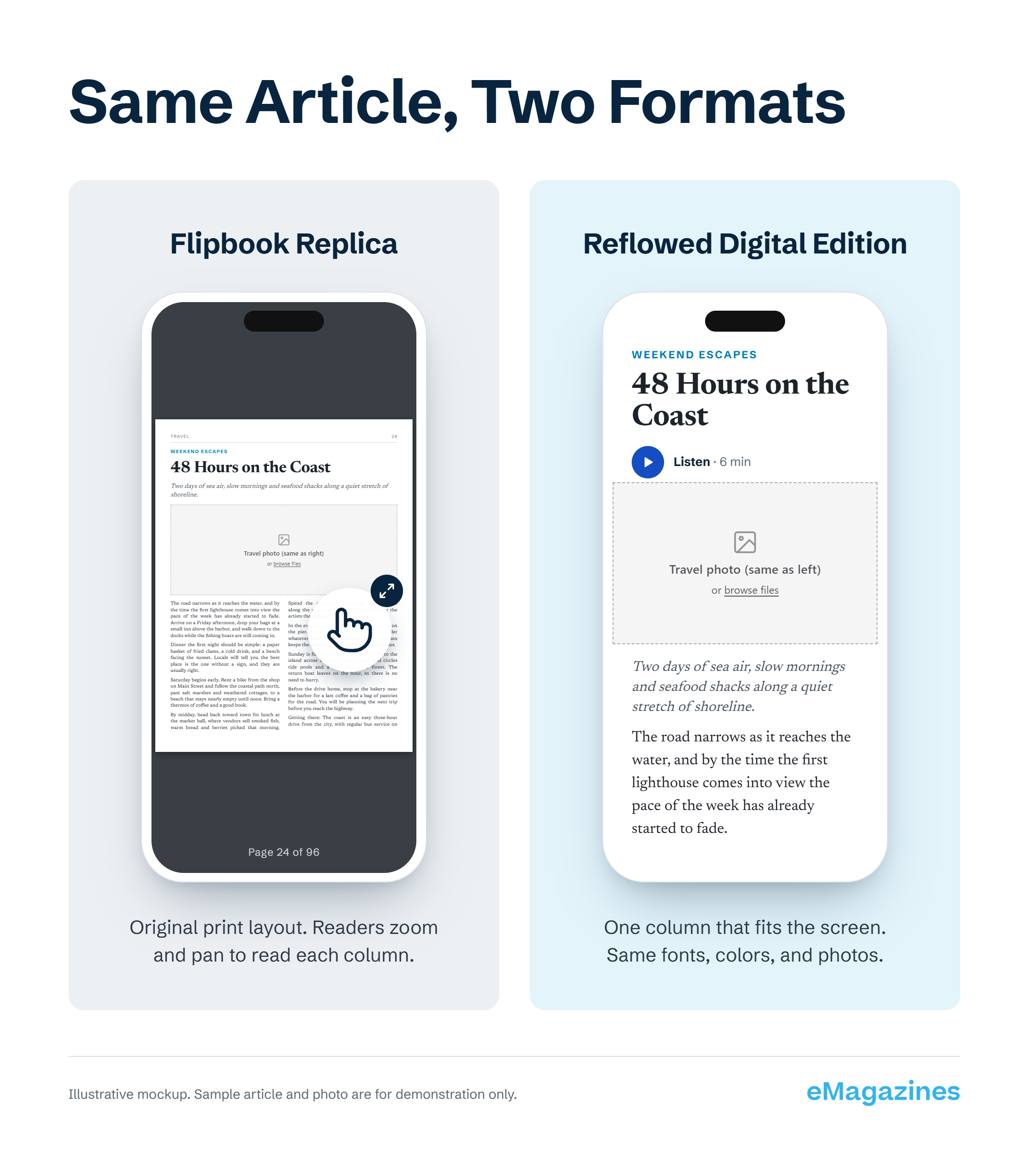
A flipbook replica shows your original page layout, with its columns, photos, and spreads in place. Readers turn pages as if they were flipping through a print magazine or book. On a phone, the whole page shrinks, so readers zoom in and move around the page to read each column.
A reflowed edition takes each article out of your PDF and lays it out as one column of text that resizes to fit any screen. Your fonts, colors, and photos stay the same, so the issue still looks like your magazine.
Each format suits different content:
- Flipbooks work well for catalogs, lookbooks, and brochures, where the visual layout matters most and people skim.
- Reflowed editions work well for magazines, where readers want to finish a 2,000-word feature on a phone.
Five of the seven alternatives to Issuu in this guide are flipbook tools. If your readers struggle to read your magazine on a phone, moving to another flipbook won’t solve that. Our guide to PDF to digital magazine conversion shows how reflowing works.
In my experience, choosing the format is a bigger decision than choosing the vendor. A page-turning replica can look beautiful on a laptop, but most of your subscribers are reading on a phone.
The 7 best Issuu alternatives in 2027
These are the seven Issuu alternatives worth considering. They’re listed from the platforms most like Issuu down to the two that use reflowed editions instead of flipbooks.
1. Calaméo: the closest like-for-like Issuu replacement
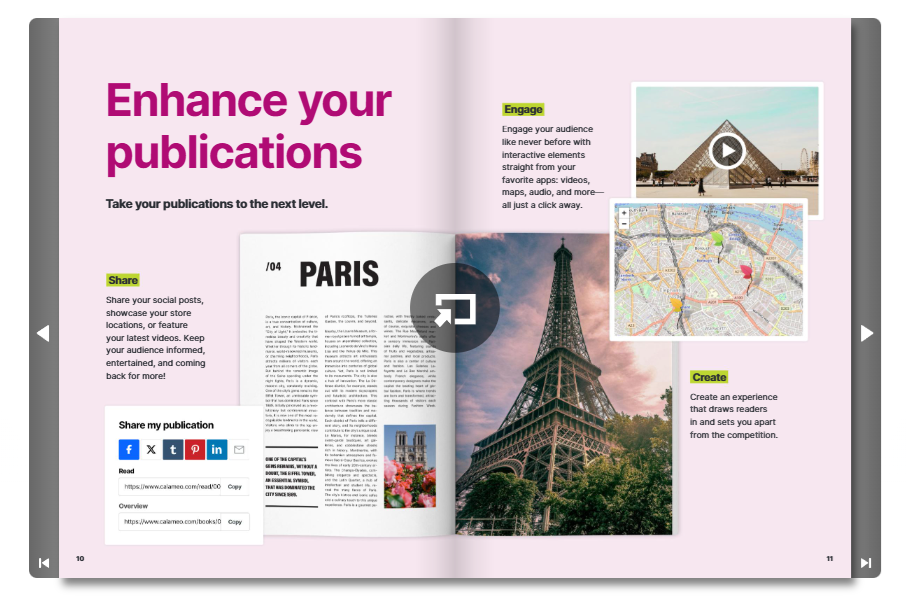
Calaméo is a French publishing platform that works much like Issuu. You upload a PDF, Calaméo turns it into a flipbook, and you share it with a link or embed it on your site. Readers can also find your publications in Calaméo’s public library.
Choose Calaméo if you want an alternative to Issuu that keeps the same flipbook workflow at a lower price. Private publishing limits grow with each plan: 5 private publications on the free Basic plan, 500 on Premium, and 2,500 on Platinum.
Pros: The workflow will feel familiar from day one. Of all the tools here, it’s the most similar to Issuu in everyday use, more so than Yumpu.
Cons: It uses the same replica format as Issuu, so reading on a phone won’t improve.
Key features:
- PDF to flipbook conversion with sharing and embedding
- Public library for discovery
- Private publishing that scales by plan
- Branding, analytics, and integrations on Platinum
Pricing: Free Basic plan. Premium is about $14 per month billed annually ($168 per year). Platinum is about $49 per month billed annually ($588 per year).
2. Yumpu: best free or low-cost option
Swiss-based Yumpu offers a free plan for up to three magazines. The adFREE plan removes third-party ads, adds your own branding to the reader, connects Google Analytics, and lets you password-protect issues. Yumpu also converts your PDF to HTML so search engines can read the text.
For a branded online newsstand, the WEBKiosk plan lets you build your own kiosk in your corporate design. App plans add your own iOS or Android app.
Pros: Removing ads on Yumpu costs a fraction of what Issuu charges for Unlimited, the plan you’d need on Issuu to remove external ads. Yumpu’s free plan also includes more than Calaméo’s.
Cons: The free plan shows ads on your content. If you want the experience most like Issuu, Calaméo is a better match. Yumpu is also a flipbook format.
Key features:
- Free plan for up to three magazines
- Ad-free reading, branding, and Google Analytics on adFREE
- HTML conversion for search engine indexing
- Branded online kiosk on WEBKiosk
Pricing: Free plan. adFREE is €14.95 per month billed annually (€179.40 per year). WEBKiosk is €69 per month billed annually. App plans start at €178 per month.
3. FlipHTML5: best for selling issues on a small budget

For Issuu users, FlipHTML5’s main appeal is cost. The platform turns PDFs, Word files, PowerPoint files, and images into HTML5 flipbooks. On Issuu, both selling issues and removing ads require Unlimited. FlipHTML5’s Pro plan removes ads and the watermark, adds password protection, and lets you sell publications at a much lower price.
Pros: If you need to sell issues on a tight budget, FlipHTML5 is the strongest choice on this list. It costs a little more than Calaméo but includes selling on its entry plan. Yumpu is better for free public publishing, but FlipHTML5 is better for selling.
Cons: The free plan shows ads and a watermark. Custom domains and batch conversion require Platinum. It’s also a flipbook format.
Key features:
- Converts PDF, Word, PowerPoint, and image files
- Publication selling and password protection on Pro
- Custom domain, batch conversion, and 3 users on Platinum
- Android app building on Enterprise
Pricing: Free plan. Pro is $15 per month billed monthly ($149 per year billed annually). Platinum is $35 per month ($299 per year). Enterprise is $99 per month.
4. Flipsnack: best for designing catalogs from scratch

Flipsnack stands apart from Issuu because of its Design Studio. Your team can build a publication from templates instead of uploading a finished PDF. It’s strongest for product catalogs, with product tags, shopping lists, and lead forms on the Pro plan and up.
When you compare Issuu vs Flipsnack, the main question is whether you need a design tool or only a place to host finished PDFs.
Pros: Flipsnack is the better choice when your team creates content inside the platform. If you mainly share and track documents you already have, FlippingBook is a better option.
Cons: The Starter plan allows 5 flipbooks of up to 100 pages and keeps the Flipsnack watermark on website embeds. Password protection starts on Pro.
Key features:
- Design Studio with templates
- Product tags, shopping lists, and lead forms
- Analytics and Google Analytics integration
- Custom domains and full branding on Business
Pricing: Free plan (5 flipbooks of up to 15 pages). Starter is $16 per month billed annually ($35 billed monthly). Pro is $38 per month billed annually. Business is $85 per month billed annually.
5. FlippingBook: best for sales and marketing documents

Sales and marketing teams use FlippingBook to share brochures, proposals, reports, and catalogs. You can see how each reader engages, capture leads with forms, and control access with passwords, email or domain authorization, and SSO. It also connects to Canva and, through Zapier, to hundreds of sales and marketing apps.
In an Issuu vs FlippingBook comparison, FlippingBook doesn’t have Issuu’s public discovery platform or built-in selling. Instead, it gives you more control over who can open each document and better tracking of who reads what.
Pros: FlippingBook works well for sales, marketing, and HR teams. It focuses more on sharing and tracking than Flipsnack, which focuses more on design.
Cons: It has no built-in way to sell content, so it’s less suited to a magazine that sells subscriptions.
Key features:
- Individual reader tracking and lead capture forms
- Passwords, protected embeds, and SSO for readers
- Canva integration and Zapier connections
- Branded bookshelves for organizing documents
Pricing: From $26 per month, with a free trial available.
6. eMagazines: best for magazine publishers with paying subscribers

eMagazines uses a reflowed format instead of a flipbook. We turn your print PDF (or XML or JSON) into a digital edition where each article is a single column that fits any screen. Your fonts, colors, and photos carry over from print. This is how the Mobile Optimized Reader works.
How eMagazines differs from flipbook tools. With a flipbook platform, your team does the production and delivery work. eMagazines covers the whole digital edition, from your PDF to the subscriber’s inbox:
- Easy access for subscribers. Readers open each issue from a secure email link. They don’t need to download an app or remember a password, and each reader sees a library of every issue they’re entitled to.
- Production done for you or with you. With Turn-Key Production & Fulfillment, our team can handle conversion, styling, quality checks, and delivery. You can also work alongside us and keep part of the process in-house.
- Audio for every article. Optional AI-generated audio articles let readers listen while they commute or cook.
- Apple News+ and AAM support. eMagazines is an Apple News Preferred Provider, so we can handle Apple News+ production for you. We also support AAM digital replica reporting, which matters if your title is audited.
Email delivery also matches how many people already get their reading. Pew Research Center also found that 34% of U.S. adults get news from email newsletters at least sometimes.
For large publishers. Well-known magazines such as People, TIME, Cosmopolitan, and Rolling Stone run their digital editions on eMagazines. Large publishers get production at scale, Apple News+ support, AAM reporting, analytics, and end-user customer support, so their own teams don’t have to answer reader questions.
For niche and local magazines. You don’t need a national circulation to benefit. LOCAL Life, a lifestyle magazine serving Hilton Head Island, Bluffton, and Beaufort, has used eMagazines since 2021 to give local readers an online magazine they can read on any device. For a small team, the done-for-you service is often the biggest benefit, because no one on staff has to learn digital production.
The switch from a PDF to a reflowed edition made a measurable difference for them:
“In one week we had 13,000 views on our eMagazines digital edition with an average engagement time of eight minutes. We never had that with our PDF only digital version.” – Laurie Laykish, President and Founder, Local Life Media Group
If you publish a handful of brochures a year, eMagazines is more than you need. We built it for publishers with paying subscribers, a regular production schedule, and readers who expect each issue to arrive on time and open without a login.
Pricing: Custom pricing based on your publication’s size and the services you need, with plans for national publishers as well as small regional and niche magazines.
7. MagLoft: best for self-serve publishers who want branded apps
Singapore-based MagLoft is the other reflow option on this list. Like eMagazines, it converts PDFs to responsive HTML instead of a flipbook. Every plan includes a progressive web app, AI text-to-speech, and PDF to HTML conversion. The Professional plan adds iOS and Android apps, an AI social media publisher, tiered subscriptions, and Apple News integration.
Pros: MagLoft is the closest self-serve option to eMagazines, and its pricing is published up front. It’s built for selling issues and subscriptions inside your own branded app.
Cons: You manage more of the work yourself, while eMagazines offers done-for-you production and subscriber delivery. It also costs far more to start than Issuu. MagLoft’s pricing page lists Apple News integration on Professional as a Q1 2026 addition, so ask whether it’s available before you sign up.
Key features:
- PDF to HTML conversion and AI text-to-speech on every plan
- Progressive web app, plus iOS and Android apps on Professional
- Single issue sales, subscriptions, and coupon codes
- Custom development on Tech Studio
Pricing: Starter is $199 per month. Professional is $499 per month. Tech Studio is custom.
How do you choose the right Issuu alternative?
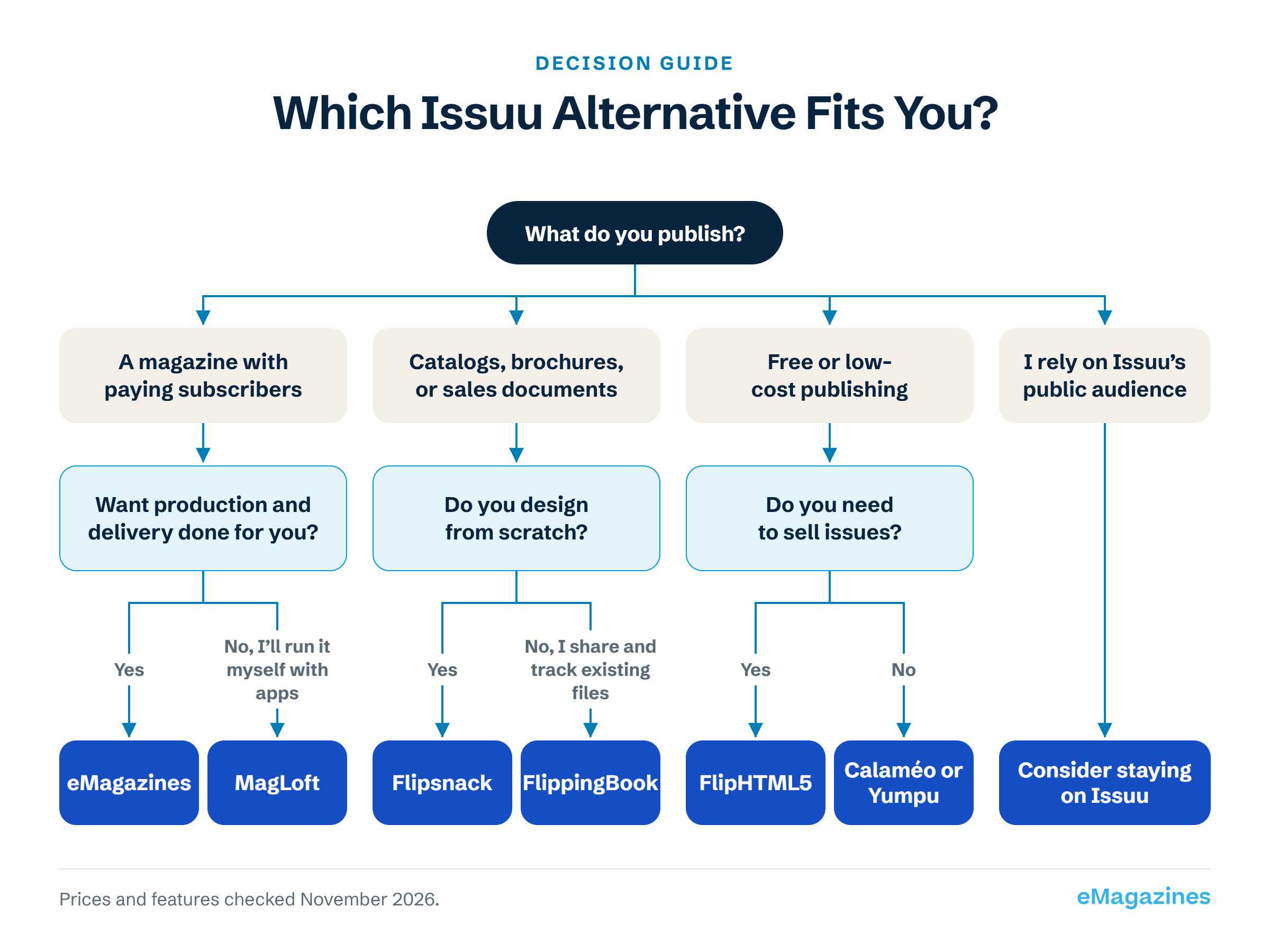
Choose an Issuu alternative based on who reads your content and how you earn from it:
- You sell subscriptions, and readers finish full articles on their phones: choose a reflowed edition. Pick eMagazines for done-for-you production and delivery, or MagLoft if you want to run it yourself with apps.
- You want a near-identical flipbook for less money: choose Calaméo or Yumpu.
- You want to sell single issues from a flipbook on a small budget: choose FlipHTML5.
- You design catalogs and need shopping features: choose Flipsnack.
- You share sales and marketing documents and want to track readers: choose FlippingBook.
- You rely on Issuu’s public audience for discovery: you may be better off staying on Issuu and improving the mobile reading experience another way.
During a demo, ask each vendor two questions: “Can you show me a real issue on a phone?” and “How do subscribers get access, and what happens when they cancel?” Their answers will show you how the platform works in practice.
For a wider look beyond Issuu competitors, our roundup of digital magazine platforms covers 20 options.
What to plan before you move off Issuu
Before you move off Issuu, plan for four things: your back issues, subscriber access, existing links and embeds, and your reporting.
- Back issues. Decide which issues you’ll move, then check that you still have the original PDFs. Rebuilding an issue from a flipbook is slow, so having the source files saves time.
- Subscriber access. Map who is entitled to which issues so nobody loses content they paid for. A subscriber back issue archive gives every reader one place to find everything they own.
- Links and embeds. List every page on your website that embeds an Issuu flipbook. Plan a replacement for each one before you cancel, so you don’t leave broken embeds behind.
- Reporting. Export your Issuu statistics first so you have a baseline to compare against. If your title is audited, confirm your new platform supports AAM digital replica reporting.
The step publishers skip most often is mapping who is entitled to which back issues. If you sort that out before you switch, the move goes much more smoothly for your subscribers.
If you’re also reviewing circulation, billing, or design tools, our guide to magazine software covers 25 options by category.
Choosing between flipbook and reflowed Issuu alternatives
For catalogs, brochures, and marketing content, flipbook tools are good Issuu replacements. Calaméo, Yumpu, and FlipHTML5 cost less, and Flipsnack and FlippingBook offer more tools for marketing teams.
For a magazine with paying subscribers, settle the reading format first, as covered above, and then compare vendors. A reflowed edition lets your readers finish an issue on a phone. To see an example, get in touch with our team, and we’ll show you an edition on your own device.
Issuu alternatives FAQs
Is Issuu free in 2027?
Issuu has a free Basic plan in 2027, but it’s limited to 5 published documents, 10 pages per upload, and 50 MB per file. Free publications also carry Issuu branding and show ads to readers. The Starter plan adds embedding and statistics, but external ads remain until you upgrade to Unlimited. Yumpu and FlipHTML5 also offer free plans, though both show ads as well.
What is the closest platform similar to Issuu?
Calaméo is the platform most similar to Issuu. Both turn a PDF into a flipbook, let you share or embed it, and offer a public library where readers can discover publications. Calaméo’s paid plans start at a lower price than Issuu’s ad-free tier, and private publishing limits increase with each plan, up to 2,500 private publications on Platinum.
Can I move my existing Issuu publications to another platform?
Yes, but you’ll need to re-upload your issues from the original PDFs. Before you cancel Issuu, gather your source files, export your statistics, and list every embed on your website. Full-service platforms like eMagazines can convert your back catalog for you.
Which Issuu competitors let you sell issues and subscriptions?
Several Issuu competitors let you sell. FlipHTML5 includes selling on its Pro plan, the lowest-cost option on this list. MagLoft sells single issues and subscriptions through its web and mobile apps. Yumpu’s top plan sells through your own branded apps. eMagazines supports subscription sales with subscription order pages and delivers each issue to paying readers by email.